Masonry JQuery plugin for a ‘Pinterest-like’ APEX Layout

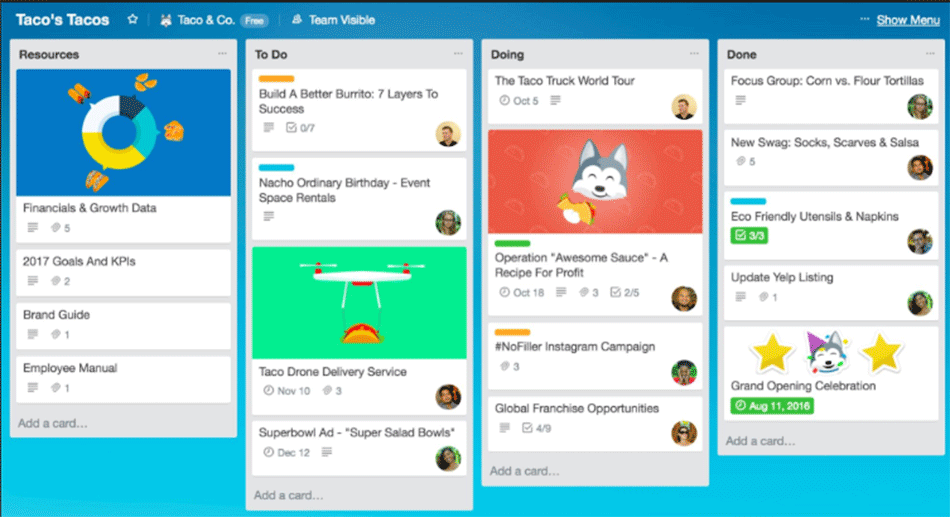
Like me, you may have noticed the growing number of websites that appear to emulate the Pinterest layout. It is one of the hottest page layouts out there these days, and for good reason. It’s a Dynamic Grid that sort of floats, and rearranges and repositions all the child elements next to one another. When you resize the window, everything follows and still looks great.

It’s a great layout if you have a lot of stuff to display on a page that does not fit into a traditional grid, where you might have a lot of wasted space. One of my APEX pages was very well-suited to be a candidate for a Dynamic Grid make-over, and I was quite happy with the results, so I thought I’d share! It was extremely simple to do, thanks to the Masonry JQuery plugin.

1. Start by downloading the Masonry plugin here, and uploading it to your server.

2. Create a new page in your APEX app, and add the following code in an HTML region, using ‘No Template’, with Display Point ‘Before Footer’ (This is assuming the JQuery selector for your grid element is ‘item’). This could also, of course, be added to a Page 0 of you were going to use in on multiple pages within your app.

<script>
 $(function()
{ $('#container').masonry({
// options
itemSelector : '.item',
columnWidth : 240 }); });
</script>

3. Add the following code to the ‘HTML Header’ section of your page. These are the styles I used, however you will obviously want to tweak them for your own requirements.

 <script src="/js/jquery.masonry.min.js"></script> 
<style>
.item
{ width: 220px;
margin: 5px;
background: #D8D5D2;
font-size: 12px;
float: left;
padding: 5px;
-webkit-border-radius: [...]

By |August 13th, 2012|APEX, JQuery|3 Comments

Top 5 reasons to attend APEXposed, Montreal!

Just got back from Kscope 12 and can’t wait for Kscope 13? Missed Kscope, and sorry that you did? Well, ODTUG has just the event for you: APEXposed 2012, 2 days of exclusive Application Express content, delivered by some of the top names in the APEX community.

I for one was lucky enough to attend Kscope 12, and my head is still spinning from all the fantastic content and new knowledge I gained. But that won’t stop me from attending APEXposed! Well, it certainly helps that the event is being held in my hometown of Montréal, but it also gets me over my regret of missing some great sessions in San Antonio.

Here are my top 5 reasons for attending APEXposed:

        1. World-renowned APEX experts

          Oracle Ace Directors (Raj Mattamal, Scott Spendolini, Martin D’Souza, John Scott), Oracle Aces (Francis Mignault and Dan McGhan) and more leading APEX experts come together to deliver 2 days of exclusive APEX content. What better opportunity to learn from the crème de la crème, share tips and tricks, and get those questions of yours answered!

        2. Amazing content (20 presentations, keynote talk and panels)

          At KScope, I had to make some tough choices. I was particularly interested in learning about how Christian Rokitta has used JQuery Mobile to give his FIFApex app a mobile twist! But alas, it was running against Martin D’Souza’s presentation about APEX 4 + HTML 5. I missed that one, and kept hearing about it all week. Now’s my chance to catch it! Also, if you have not yet seen the new improvements in APEX Error Handling in 4.1, you […]

By |July 5th, 2012|APEX, Oracle|0 Comments

Full database audit trail: tracking user changes

Rarely do I roll out an application anymore without implementing a full audit trail enabling me (or a system administrator) to get a full history of all changes that may have occurred on any record.

I have been using this system for years, adapting it from an original post I found many years ago. I can no longer tell you where the original came from, but I thought I would share it will you as I have found it to be invaluable to me on many occasions.

The basic concept is simple. I start with a generic audit trail table that will capture key information about all database changes:


CREATE TABLE AUDIT_TRAIL

( “ID” NUMBER,
“TABLE_NAME” VARCHAR2(50 BYTE),
“EVENT” VARCHAR2(10 BYTE),
“COLUMN_NAME” VARCHAR2(100 BYTE),
“OLD_VALUE” VARCHAR2(4000 BYTE),
“NEW_VALUE” VARCHAR2(4000 BYTE),
“USER_UPD” VARCHAR2(100 BYTE),
“DATE_UPD” DATE,
“PK_1″ NUMBER(10,0),
CONSTRAINT “AUDIT_TRAIL_PK” PRIMARY KEY (“ID”)
);

CREATE SEQUENCE AUDIT_TRAIL_SEQ START WITH 1 INCREMENT BY 1;
/

CREATE TRIGGER AUDIT_TRAIL_TRG
BEFORE INSERT ON audit_trail
FOR EACH ROW
BEGIN
select audit_trail_seq.nextval into :new.id from dual;
end;

/

I use a package (audit_pkg) that is called in a before update trigger (see below), that evaluates every column in the table and checks for changes. The 3 procedures are basically identical, however for number and date fields, the old and new values are converted to VARCHAR before inserting into the audit_trail table.

package audit_pkg
as
procedure check_column_var( l_tname in varchar2,
l_cname in varchar2,
l_new in varchar2,
l_old in varchar2,
l_event in varchar2,
l_pk1 in number);

procedure check_column_num( l_tname in varchar2,
l_cname in varchar2,
l_new in number,
l_old in number,
l_event in varchar2,
l_pk1 in number);

procedure check_column_date( l_tname in varchar2,
[…]

By |May 7th, 2012|APEX, Oracle|2 Comments

JQuery Cluetip APEX implementation

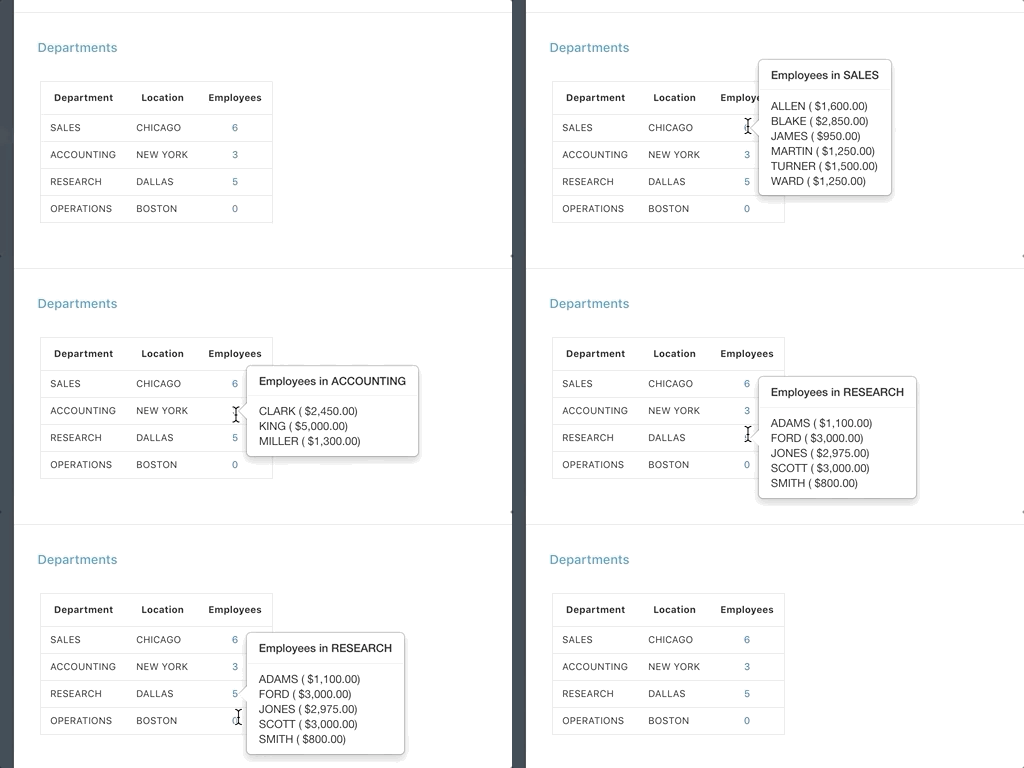
I love a website that uses tooltips and cluetips well. They’re a great way to provide additional information to a user without cluttering up the page, and of course, they also look really cool. :-)

My first stop, as always, when wanting to add a ‘cool’ feature to an APEX app, is the APEX Community-based plugin repository. A quick search for Tooltip and Cluetip yielded one I have recently been using in most of my apps: a Tooltip Dynamic Action Plugin, whose content can be retrieved via a number of methods, including PL/SQL. I use this one to display tooltip help for my application items, pretty much exactly as the instructions say on the demo page. Works great, why reinvent the wheel!

But what if you have a great APEX region on your page that you decide would best be implemented as a Tooltip/Cluetip. This could be a Report Region, a Form Region, a Dynamic PL/SQL region, or even a Chart Region. You’ve already done the work implementing it on your page, and it is certainly quicker than coding a new PL/SQL procedure to render it as a tooltip.

I visited the JQuery Cluetip Plugin page, and scanned the demo page for something interesting to use. One of them uses local content from a hidden <div> element, which struck me as a good candidate for my requirements. I downloaded the source, and set to work, referring back to a presentation I saw a couple of years ago on the Sumneva site.

Step 1: Jquery includes

You can […]

By |April 28th, 2012|APEX, JQuery, Plugin|0 Comments

APEX Clickable Progress Wizard with Automatic Saving

I was recently asked to implement a fairly large and complicated form in APEX. Rather than displaying something long and scary to users on a single page, we decided to break it out into sections on different pages, and use a Sidebar Navigation Region that would show the user which section he/she was currently filling out, and where in the process he/she was, as in the example below. By the way, this also happened to be the same form in which I implemented a simple yet powerful workflow using Dynamic PL/SQL.

We decided to use the Progress Wizard List Template, and with that, we were pretty much 80% of the way there. Gotta love APEX! We just needed to make a few small tweaks.

 1.We wanted the user to be able to navigate to a specific section of the form by clicking on the relevant sidebar link on the left. This meant branching to a different page.

2. We also wanted to trigger an automatic save (SUBMIT) of the form when he/she clicked on the relevant sidebar entry, without having to click on the ‘Save’ button.

By default, the template simply displays where the user is at in the process, but does not include hyperlinks nor does it submit the page.
Submitting the page is easy enough,however, I somehow needed to be able to tell the ‘After Processing’ Branch which page to branch to, based on which Step the user clicked on.
Here is what I did:

1. Created a Page 0
2. Added the following (hidden) item to Page 0: P0_BRANCH_PAGE
3. Added an After Submit branch to each of the pages involved in the workflow, […]

By |April 27th, 2012|APEX|9 Comments

Simple workflow implementation in APEX

A client of mine wanted me to build an online form using Oracle APEX that, while fairly simple in design, had a fairly complicated workflow associated with it.

Each document had to flow through many different approval levels, and at each point, the possible actions a user could take would differ.

At first glance I thought I’d just manually create a lot of different buttons on the page and use various authorization schemes to display or hide them depending on document status and user role. I did not look forward to this task, considered the likeliness of the workflow changing (high!), and thought there must be a better way.

What I ended up doing was translating the workflow into table form based on the current document status.

TBL_STATUS_WORKFLOW

ID number;
CURRENT_STATUS number;
NEXT_POSSIBLE_STATUS number;

Both CURRENT_STATUS and NEXT_POSSIBLE_STATUS are foreign keys to a TBL_STATUS table, that looks like this:

TBL_STATUS

STATUS_ID number;
STATUS_DESCRIPTION varchar2;
BUTTON_REQUEST varchar2;
BUTTON_LABEL varchar2;

Say, for example, my document is in DRAFT mode (status). My workflow says that a document that is still in ‘Draft’ can go either to ‘Submitted to Level 1′ status or ‘Withdrawn’. Ideally, at this point, I would like to display 2 buttons to my user: ‘Submit to Level 1′ that would trigger a status change and email to appropriate party, and ‘Withdraw’, which would also trigger a status change.

My tables look something like this (small sample only):

TBL_STATUS

STATUS_ID STATUS_DESCRIPTION BUTTON_REQUEST BUTTON_LABEL
1 Draft
2 Submitted to Level 1 SUBMIT_LVL_1 Submit to Level 1
3 Withdrawn WITHDRAW Withdraw
4 Submitted to Level 2 SUBMIT_LVL_2 Submit to Level 2
5 Returned for revisions RETURN_REV Return for Revisions

To translate my workflow and indicate that the document can move from Draft to either Submitted to Level 1 […]

By |April 20th, 2012|APEX|7 Comments

There’s a plug-in for that!

I’ve been working with APEX since 2004, and have used most versions since HTMLDB 1.6. The use of plug-ins since version 4  is definitely very high on my list of favorite new features.

I’m a frequent visitor of the community-based APEX plugin repository, and rarely do I roll out a new client app anymore without including at least one plug-in. The SkillBuilders Modal Page is a personal favorite, and I have used it countless times. For phone number fields, I really like the Text Field with Masked Input. One of my pet peeves is a website that asks for a phone number, or postal code (Canadian’s postal codes are sometimes input as XXX-XXX, XXXXXX or even XXX XXX), without providing an input mask. Drives me bananas!!! Seriously, guys (and gals, of course!), take the extra time to program an input form that won’t bug out because the user can’t guess how you want to see the postal code… But I digress.

ODTUG is holding its first ever world wide APEX Plug-ins competition! Now I won’t lie and say I will be participating, I am more of a plug-in ‘consumer’ than ‘creator’, but I eagerly await the results. So here is is your opportunity to write an APEX plug-in and have it viewed by the entire international APEX competition. The winner will be crowned 2012 ODTUG APEX Plug-in Developer of the Year, and there are some great prizes to be won.

Have a plug-in you’ve been playing with, incubating, maybe a bit reluctant to release out into the wild, APEX world? Here’s your chance!

Visit the ODTUG Application Express Competition page now, for more information about how to register. I […]

By |April 12th, 2012|APEX|1 Comment

Oracle APEX and Oracle Text integration

A client of mine wanted to use the power of Oracle Text to search for keywords in BLOBs stored within their database, using APEX as the front-end.

I’d never worked with Oracle Text before, and did not find too many posts about it’s integration with APEX, so I thought I’d write up how I went about it, as it may be of interest to others.

Step 1: Privileges for schema owner

The schema owner where your app resides will need some grants before being able to use the Oracle Text packages. Ensure you’ve granted the following:

GRANT CTXAPP to ;
GRANT EXECUTE ON CTXSYS.CTX_CLS TO ;
GRANT EXECUTE ON CTXSYS.CTX_DDL TO ;
GRANT EXECUTE ON CTXSYS.CTX_DOC TO ;
GRANT EXECUTE ON CTXSYS.CTX_OUTPUT TO ;
GRANT EXECUTE ON CTXSYS.CTX_QUERY TO ;
GRANT EXECUTE ON CTXSYS.CTX_REPORT TO ;
GRANT EXECUTE ON CTXSYS.CTX_THES TO ;
GRANT EXECUTE ON CTXSYS.CTX_ULEXER TO ;

Step 2: Create the index on your BLOB table

create index hdocsx on ) indextype is ctxsys.context
  parameters ('filter ctxsys.auto_filter');

I used the auto-filter parameter as this is recommended for PDF documents, which is what we happened to be working with. Read the Oracle documentation to ensure you use the filter that is right for your requirements.

Important: ensure your table to be indexed has a primary key defined before you create your index or it will be unusable for some of the Oracle Text functions such as MARKUP or SNIPPET, for example.

Step 3: Create an APEX report page, with a regular Report Region on your BLOB table

You can now include Oracle Text functions such as CONTAINS. For example, with a blob field ‘CONTENTS’, and a form search field ‘:P1_SEARCH’, you could use

select file_name, doc_id, xxx, yyy

from BLOB_TABLE

where CONTAINS(contents,’:P1_SEARCH’)>0

Such a query would return any documents that contain the […]

By |December 29th, 2011|APEX|1 Comment